How to Choose the Best LCD Monitor for Your Needs?
When selecting an LCD monitor, understanding your needs is essential. As Mark Turner, a leading expert in display technology, once stated, "Choosing the right LCD monitor can significantly impact your work and comfort." The market offers various options, making the decision challenging.
Consider resolution, size, and panel type. A higher resolution can enhance clarity and detail, helping with graphic design or gaming. For casual use, a standard monitor suffices. Size matters too; a larger screen can improve productivity but may strain your workspace.
Don't overlook features like refresh rates and color accuracy. These attributes can affect your overall experience. It's important to reflect on your specific tasks. What works for one person might not suit another. Evaluate your needs carefully to find the best LCD monitor for you.
Understanding Different Types of LCD Monitors Available in the Market
When selecting an LCD monitor, understanding the types available is crucial. Different technologies cater to specific needs. For example, IPS panels offer wide viewing angles and accurate colors, making them ideal for design work. Conversely, TN panels are generally faster and cheaper, appealing to gamers who prioritize response time over color accuracy.
According to market analysis from DisplayMate, the demand for IPS technology has surged, with more than 70% of users preferring its superior color performance. VA panels, known for their deep blacks and higher contrast ratios, are excellent for media consumption. Their vibrant visuals can enhance the viewing experience, especially for movies and gaming.
Tips: Look for monitors that support HDR for better brightness and color range. Check for at least 99% sRGB coverage if color fidelity matters for your projects. Be ready to explore refurbished options; they can provide excellent value without sacrificing quality. Not everyone needs high-end features, so evaluate your primary use to make an informed choice.
How to Choose the Best LCD Monitor for Your Needs?
| Monitor Type |
Resolution |
Refresh Rate |
Response Time |
Ideal Use |
| TN Panel |
1920 x 1080 |
60 Hz |
1 ms |
Gaming |
| IPS Panel |
2560 x 1440 |
75 Hz |
5 ms |
Professional Work |
| VA Panel |
3840 x 2160 |
60 Hz |
4 ms |
Multimedia |
| OLED |
3840 x 2160 |
120 Hz |
0.1 ms |
High-End Gaming & Media Consumption |
Key Features to Consider When Selecting an LCD Monitor
When selecting an LCD monitor, several key features remain crucial.
One essential factor is the screen resolution.
A higher resolution will provide clearer images. Popular choices include Full HD (1920x1080) and 4K (3840x2160). Higher resolutions can enhance your viewing experience, especially for gaming and graphic design.
Another important feature is the refresh rate.
A refresh rate of 60Hz is standard, but gamers often prefer 120Hz or higher. This enhances motion clarity and reduces blur during fast-paced scenes. Keep in mind, though, that a higher refresh rate might require a more powerful graphics card.
Color accuracy should also be carefully considered.
Look for monitors with good factory calibration. This is essential for tasks requiring color precision, such as photo editing. Some monitors offer wider color gamuts, enhancing vibrancy. However, not every monitor maintains color accuracy over time. Regular calibration may be necessary.
Lastly, ergonomics and connectivity options are important.
A monitor with adjustable height, tilt, and swivel can improve comfort. Check for various ports, like HDMI and DisplayPort. Having multiple options can prevent future compatibility issues. It is always wise to reflect on how you'll use your monitor before making a decision.
Determining the Right Screen Size for Your Specific Use Case
Choosing the right screen size for your LCD monitor is crucial for maximizing your productivity and comfort. A common misconception is that bigger always means better. For instance, a 32-inch monitor can overwhelm a small desk. It may lead to neck strain from excessive head movement. Consider your workspace first. Measure your desk and room dimensions before making a decision.
Your specific use case heavily influences the ideal screen size. If you need a monitor for detailed graphic design, a larger screen, around 27 to 32 inches, may boost your workflow. However, if you primarily use it for document editing or web browsing, a 24-inch screen may suffice. Visual comfort is essential too. The monitor's distance from your eyes should align with its size. Generally, larger screens require more distance for optimal viewing.
Remember to check the resolution too. A big screen with low resolution can result in pixelation. It's disheartening to invest in a large, beautiful monitor that doesn’t deliver sharp images. Regularly think about how comfortably you can use your screen. Observing your habits can highlight what works best. You'll learn from the experience, ultimately leading to a more tailored choice.
Assessing Resolution and Refresh Rate for Optimal Viewing Experience
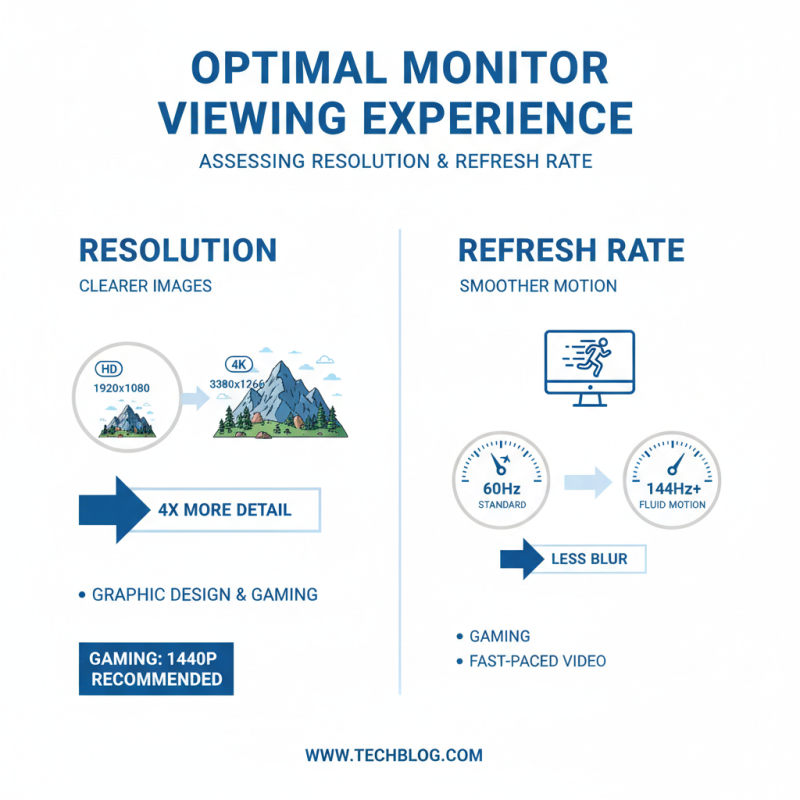
When choosing an LCD monitor, assessing resolution and refresh rate is crucial. Higher resolution provides clearer images, especially for tasks like graphic design or gaming. Most modern monitors range from Full HD (1920 x 1080) to 4K (3840 x 2160). According to industry reports, 4K displays can offer four times the detail of Full HD. For gamers, a resolution of at least 1440p is often recommended.
Refresh rate is equally important. Measured in hertz (Hz), it indicates how many times a display refreshes per second. A refresh rate of 60Hz is standard, but a higher rate, like 144Hz, offers smoother motion for fast-paced gaming. Research shows that gamers perceive a significant difference in fluidity and responsiveness at higher refresh rates. Watching videos or playing competitive games on a monitor with lower refresh rates can lead to a less enjoyable experience.
Tip: Consider your primary usage when selecting the resolution and refresh rate. For general office tasks, a 60Hz monitor may suffice. For gaming, aim for at least 120Hz for better performance. Also, remember that higher resolution and refresh rates can impact hardware performance, so ensure your setup can handle it. Balancing these factors will lead to a more satisfying viewing experience.
Comparing Budget Options vs. Premium Monitors for Value and Performance
When selecting an LCD monitor, understanding the differences between budget options and premium models is crucial. Budget monitors often provide essential features, decent resolution, and basic color accuracy. Recent industry studies show that monitors priced under $200 typically have a lower refresh rate and limited color gamut. However, they serve well for casual use like browsing and office tasks.
Premium monitors, on the other hand, frequently support advanced technologies. A report by the International Display Manufacturers Association (IDMA) indicates that monitors above $400 often offer better color accuracy and faster response times. This makes them ideal for graphic design or gaming. Investing in a premium model can enhance productivity and enjoyment.
Tip: Always check for display specs, such as color coverage and refresh rate. A 144Hz refresh rate can significantly improve viewing experience in fast-paced content.
Tip: Read user reviews on specific models. First-hand experiences can highlight pros and cons that specifications may not reveal.
Remember, balance is vital. Consider your primary use and budget constraints. The best choice may not always be the most expensive one.